
In This Article
Why a Computer Monitor Screen Cover Deserves a Spot on Your Desk
Your monitor is probably the most-stared-at object in your home, and also one of the most neglected. Dust settles on it overnight, the cat treats the top bezel like a heated shelf, coffee mugs orbit dangerously close, and in a shared office, anyone walking behind your chair can read your inbox. A computer monitor screen cover is the cheap, low-effort fix for all of that — but only if you pick the right kind.
Here’s the catch most buyers miss: “screen cover” means two very different products. One is a fabric or vinyl sleeve that slips over the whole display when it’s off, keeping dust, pet hair, and splashes out. The other is a front-mounted filter — a privacy screen or anti-glare sheet — that stays on while you work and controls who can see your screen and how much glare hits your eyes. Some people need one, some need both, and a surprising number of people buy the wrong one first.
This guide sorts that out. We compared spec sheets, manufacturer documentation, and the aggregated review sentiment we could actually verify for seven real products sold on amazon.com, from budget dust covers to enterprise-grade magnetic privacy filters. You’ll get honest analysis rather than recycled listing copy — what each feature means in practice, who each pick suits, and where each one falls short.
You’ll also find practical setup and care tips, real-world buyer scenarios, a problem-and-solution section, and the cost math over several years. Whether you’re protecting a $150 office panel or a $1,500 creative display, the right computer monitor screen cover costs a fraction of a repair — and the wrong one is a drawer ornament. Let’s make sure you get the right one.
What Is a Computer Monitor Screen Cover?
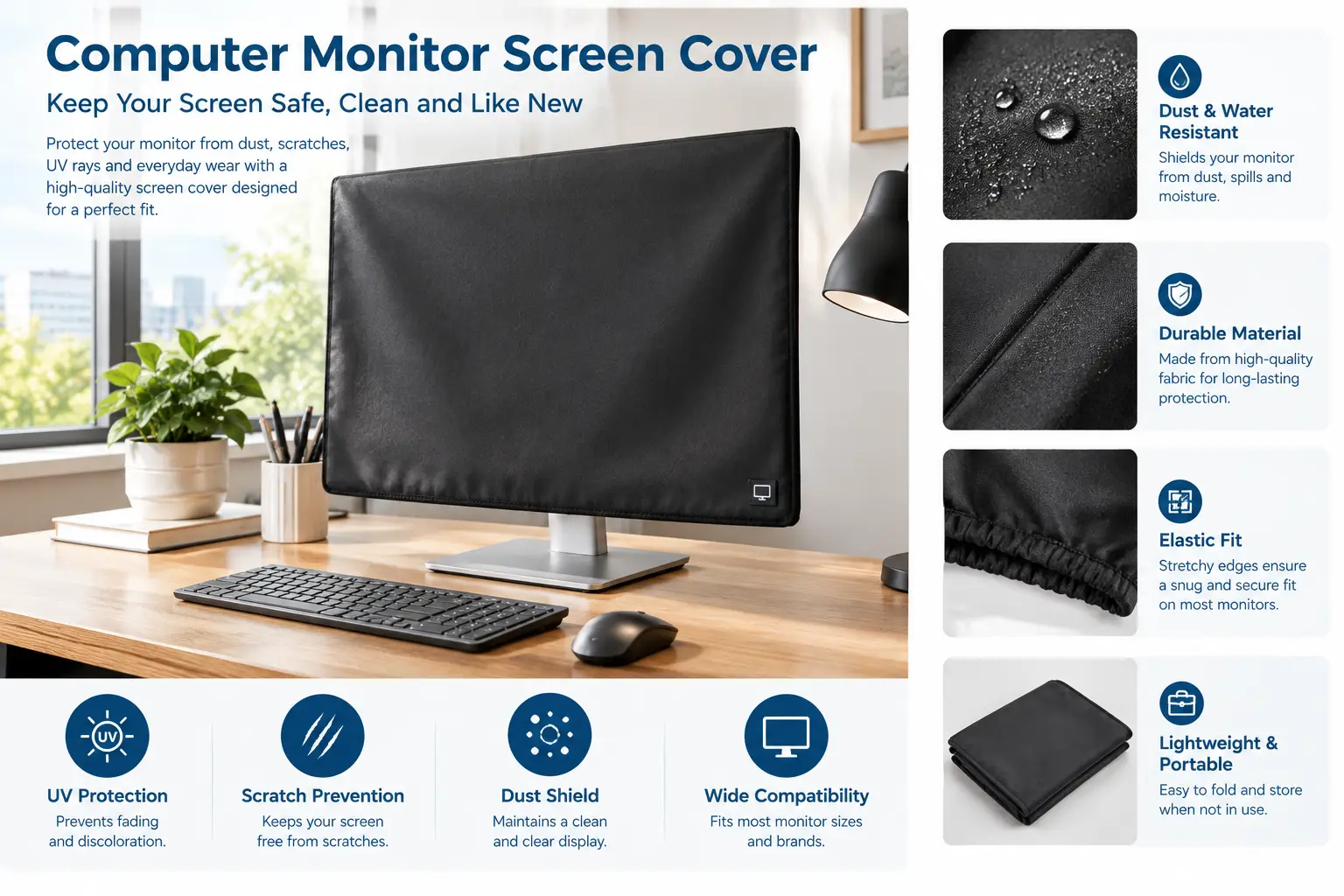
A computer monitor screen cover is any accessory that shields a display from dust, debris, scratches, spills, or prying eyes. It comes in two main forms: a removable sleeve (monitor dust cover) used while the screen is off, and a front-mounted filter (privacy or anti-glare screen) used while you work.
Dust sleeves: the “off-hours” protection
A monitor dust cover slides over the panel from the top, usually with an open bottom so the stand passes through. Good ones are made from anti-static material. That matters more than it sounds: static charge on a screen surface attracts airborne dust, and static itself is the root of electrostatic discharge, which can damage sensitive electronics when it jumps between surfaces. An anti-static sleeve doesn’t make your monitor indestructible, but it stops the cover itself from becoming a dust magnet.
Front filters: the “on-hours” protection
A monitor privacy screen uses a micro-louver layer — think of tiny vertical window blinds — that lets light travel straight toward you but blocks it at steep side angles. Most quality filters narrow visibility to roughly 30 degrees either side of center, so a coworker beside you sees a darkened panel. Many also add a matte anti-glare surface and a layer of physical scratch protection.
In short: sleeves protect the hardware while it rests, filters protect your information while it works.
Quick Comparison: 7 Computer Monitor Screen Cover Picks at a Glance
| Product | Type | Sizes / Fit | Key Strength | Approx. Price Range | Best for |
|---|---|---|---|---|---|
| SZBRO Anti-Static Vinyl Monitor Dust Cover | Vinyl dust sleeve | 22–24 in (approx. 24W x 18H x 3D in) | Splash-resistant, translucent | Under $15 | SZBRO: budget home setups |
| MOSISO Monitor Dust Cover | Anti-static fabric sleeve | 22–25 in and 26–29 in versions | Soft, washable, iMac-friendly | Around $10–$20 | MOSISO: everyday dust control |
| Computer Dust Solutions Monitor Cover | Heavy EVA vinyl sleeve | Many sizes incl. 27–28 in (28W x 18H x 4D in) | Thick 0.2 mm material | Around $15–$30 | Computer Dust Solutions: workshops, garages |
| Mancro Monitor Carrying Case | Padded travel cover | 27 in (approx. 26.7 x 18.3 in) | Velvet lining, pockets, handle | Around $25–$45 | Mancro: moving and transport |
| Peslv 2-Pack 24 Inch Privacy Screen | Privacy filter (2 units) | 24 in, 16:9 | Two filters, two mounting methods | Around $30–$50 | Peslv: dual-monitor budgets |
| Kensington MagPro Monitor Privacy Screen | Magnetic privacy filter | 21.5–31.5 in, several ratios | Magnetic strip, 2-year warranty | Around $60–$120 | Kensington MagPro: hot-desking pros |
| 3M Privacy Filter with COMPLY Magnetic Attach | Magnetic privacy filter | 21.5–27 in frameless, 16:9 | Quick-click magnets, durable coating | Around $70–$150 | 3M COMPLY: compliance-heavy offices |
Looking at the table, the split is obvious: the first four picks are sleeves for when the monitor is off, the last three are filters for when it’s on. If dust is your only problem, the MOSISO Monitor Dust Cover and the SZBRO Anti-Static Vinyl Monitor Dust Cover solve it for pocket change, while the Kensington MagPro Monitor Privacy Screen and the 3M Privacy Filter with COMPLY Magnetic Attach justify their higher prices only if visual privacy is a real requirement in your workspace.
💬 One click helps other shoppers make an informed choice too! 😊
Top 7 Computer Monitor Screen Cover Picks: Expert Analysis
1. SZBRO Anti-Static Vinyl Monitor Dust Cover — cheapest way to stop dust and splashes
The SZBRO Anti-Static Vinyl Monitor Dust Cover is the no-frills entry point: a translucent vinyl sleeve sized for 22–24 inch monitors and 22-inch iMacs, at roughly 24 x 18 x 3 inches.
Vinyl is the key detail. Unlike fabric, it doesn’t let liquid soak through, so a knocked-over glass of water beads up on the surface instead of reaching the panel. The anti-static treatment keeps the sleeve from clinging to the screen and collecting the very dust it’s supposed to block. Because the material is see-through, you can glance at the monitor’s power LED without lifting the cover — a small convenience if you forget whether you switched it off.
Based on the specs, this is the right pick for a home office, a kid’s homework desk, or a spare monitor that sits idle for days. It’s not for curved displays or monitors with chunky rear housings, since the 3-inch depth is tight.
Independent roundups we reviewed, including a KTLA buying guide, consistently place it as a value pick. We couldn’t verify a large enough pool of individual US reviews to summarize detailed sentiment, so treat fit claims cautiously and measure first.
Pros:
- ✅ Vinyl blocks small spills better than fabric
- ✅ Translucent material lets you see status lights
- ✅ Anti-static coating reduces dust cling
Cons:
- ❌ Shallow depth won’t fit bulky or curved monitors
- ❌ Vinyl looks more utilitarian than fabric sleeves
Typically under $15 — hard to beat for basic dust and splash protection on a standard flat monitor.
2. MOSISO Monitor Dust Cover — best all-round everyday sleeve
The MOSISO Monitor Dust Cover is the sleeve you’ll see recommended most often, and for good reason: it balances looks, fit range, and price better than almost anything else in its class.
It comes in two size bands — 22–25 inch and 26–29 inch — with compatibility listed for 24-inch and 27-inch iMacs. The anti-static fabric repels dust, and the sleeve design slides on from the top in about two seconds. In practice, that speed is everything: a cover that’s annoying to install ends up folded in a drawer. The soft inner surface also means you’re not dragging rough material across the panel each time.
On paper, the MOSISO is the best default for most people with a standard flat 24- or 27-inch monitor. It looks tidier on a desk than vinyl, which matters if your office doubles as a living room. Choose the size band by measuring your monitor’s width, not the diagonal.
Review sentiment we found across buying guides is broadly positive about fit and appearance. The most consistent caution, noted by KTLA’s guide, is that MOSISO’s sleeves are hard to use on curved monitors.
Pros:
- ✅ Two size bands cover most popular monitors
- ✅ Soft anti-static fabric is gentle on panels
- ✅ Clean look that suits home offices
Cons:
- ❌ Fabric won’t stop a significant spill
- ❌ Awkward fit on curved and ultrawide displays
Around $10–$20 depending on size — excellent everyday value.
3. Computer Dust Solutions Monitor Cover — toughest material for harsh environments
The Computer Dust Solutions Monitor Cover is built for places where dust isn’t a nuisance but a constant: woodshops, warehouses, garages, and factory floors.
Its spec sheet lists 0.2 mm EVA vinyl, antistatic treatment, and cold resistance down to -80°F. Translated: the material is noticeably thicker than budget vinyl, it won’t crack in an unheated garage in January, and it resists the fine particulate that slips through fabric weaves. Sizes are listed by exact dimensions (for example, 28W x 18H x 4D inches for 27–28 inch LCDs), which makes ordering more precise than “fits most 27-inch.”
The company states it has supplied covers to industrial users and home consumers for years, and that industrial focus shows in the design. If your monitor sits near sawdust, drywall dust, or shop air, this is the one to buy. For a tidy bedroom desk, it’s overkill.
We found limited monitor-specific US review data. Reviews of the brand’s keyboard covers praise quality and fit while noting they cost a bit more than generic options — a pattern consistent with this monitor cover’s positioning.
Pros:
- ✅ Thick EVA vinyl resists fine industrial dust
- ✅ Stays flexible in very cold spaces
- ✅ Precise dimension-based sizing reduces guesswork
Cons:
- ❌ Looks industrial on a home desk
- ❌ Costs more than basic vinyl sleeves
Around $15–$30 — worth the premium only in genuinely dusty spaces.
4. Mancro Monitor Carrying Case — best cover for moving and travel
The Mancro Monitor Carrying Case (model 139200BLK) doubles as a dust cover at home and a padded bag when your 27-inch display has to travel.
It uses a water-resistant nylon shell with a soft velvet interior, six adjustable rear buckles, a rubber handle, and pockets for a keyboard, mouse, or trackpad. Measuring about 26.7 x 18.3 inches and weighing roughly 1.5 pounds, it’s sized for a 27-inch iMac but adapts to similar monitors. The buckles are the real feature: they cinch the case so the monitor doesn’t slide around, which is what actually causes cracked corners during a move.
This is the pick for anyone relocating, carrying a monitor between home and office, or taking a display to a repair shop or client presentation. It’s less elegant as a full-time dust cover because of its bulk.
Aggregated review sentiment on retail listings is strongly tied to moving: buyers repeatedly describe it as a lifesaver when the original box is long gone, and several report using it on 24-inch and 27-inch curved screens.
Pros:
- ✅ Padded velvet interior protects during transport
- ✅ Six buckles keep the monitor from shifting
- ✅ Accessory pockets hold peripherals and cables
Cons:
- ❌ Bulky for everyday dust-cover duty
- ❌ Sized mainly around 27-inch displays
Around $25–$45 — cheap insurance compared with a cracked panel.
5. Peslv 2-Pack 24 Inch Privacy Screen — best value for dual-monitor setups
The Peslv 2-Pack 24 Inch Privacy Screen delivers two privacy filters for roughly the price many brands charge for one, which makes it the obvious choice for dual 24-inch setups.
Each filter fits 24-inch 16:9 monitors and narrows visibility to roughly ±30 degrees. The package includes four sets of clear adhesive strips, four sets of slide-mount tabs, cleaning kits, and a microfiber cloth. Two mounting methods matter: adhesive strips suit frameless screens, while slide-mount tabs work on monitors with a raised bezel. The filters are dual-sided — matte on one face for glare, glossy on the other for sharper text.
Based on comparing the specs, the Peslv fits budget-conscious remote workers, small offices, and anyone who wants privacy without committing to a premium brand. If you remove the filter daily, the tab method will hold up better than repeated adhesive use.
Independent reviews we found are generally favorable on value and clarity. The recurring complaint is that the included adhesive strips may not grip well without extra tape.
Pros:
- ✅ Two filters for one modest price
- ✅ Adhesive and slide-tab mounting both included
- ✅ Reversible matte and glossy surfaces
Cons:
- ❌ Included adhesive strips can lose grip
- ❌ Fixed 16:9 sizing limits compatibility
Around $30–$50 for the pair — strong value per screen.
6. Kensington MagPro Monitor Privacy Screen — easiest on-and-off privacy
The Kensington MagPro Monitor Privacy Screen (for example, model K58357WW for 24-inch 16:9) solves the biggest annoyance with privacy filters: taking them off and putting them back.
A slim magnetic strip attaches along the top of the monitor, so the filter snaps on and lifts off without adhesive residue. Kensington lists viewing narrowed to about 30 degrees, a low-reflective coating, blue-light reduction of up to 22%, and reversible matte/glossy sides. It’s TAA-compliant for federal purchasing and carries a 2-year limited warranty. Practically, the magnet system means you’ll actually remove it to share your screen in a meeting — and actually put it back afterward.
This is the filter for hybrid workers, hot-desking offices, and anyone presenting on their own monitor several times a day. The longer warranty also helps when IT is buying in bulk.
We couldn’t verify a broad base of Amazon US reviews for the monitor version specifically. A hands-on review of Kensington’s related MagPro Elite line praised the snap-on magnetic attachment and the matte finish.
Pros:
- ✅ Magnetic strip makes removal fast and clean
- ✅ Two-year warranty beats most competitors
- ✅ Available in many sizes and aspect ratios
Cons:
- ❌ Costs more than adhesive-mount filters
- ❌ Magnetic strip adds a visible top edge
Around $60–$120 depending on size — fair for daily on-off use.
7. 3M Privacy Filter with COMPLY Magnetic Attach — premium pick for regulated offices
The 3M Privacy Filter with COMPLY Magnetic Attach (for example, model PF238W9EM for 23.8-inch frameless monitors) is the filter compliance teams tend to standardize on.
According to 3M’s product documentation, it blacks out side views outside a 60-degree viewing cone, uses rare-earth magnets in quick-click brackets, adds a matte surface that cuts glare and fingerprints, and is rated to survive hundreds of cleanings. Every unit is hand-inspected. The brackets are engineered to minimize the gap between filter and panel, which reduces the blurring and ghosting cheap filters can cause. One important limit: COMPLY is designed for full-screen (frameless) monitors, not raised-bezel models.
Choose the 3M COMPLY filter if you handle patient records, financial data, or client files in a shared space and want consistent, durable hardware across a team. Home users with no visual-hacking risk won’t get value from the premium.
3M filters appear repeatedly as top picks across independent 2026 roundups. We couldn’t verify enough individual US reviews to summarize detailed complaints, so confirm your monitor is frameless before ordering.
Pros:
- ✅ Strong blackout privacy beyond 60-degree cone
- ✅ Durable coating survives frequent cleaning
- ✅ Magnetic brackets reduce fingerprints on filter
Cons:
- ❌ Not designed for raised-bezel monitors
- ❌ Highest price in this lineup
Around $70–$150 depending on size — justified where privacy is a compliance issue.
Side-by-Side: How the 7 Picks Compare on What Matters
| Product | Protects When | Attachment | Spill Resistance | Privacy | Review Sentiment (verified themes) | Best for |
|---|---|---|---|---|---|---|
| SZBRO | Off | Slip-on sleeve | Good (vinyl) | None | Value pick in roundups | SZBRO: budget desks |
| MOSISO | Off | Slip-on sleeve | Low (fabric) | None | Positive; weak on curved screens | MOSISO: most flat monitors |
| Computer Dust Solutions | Off | Slip-on sleeve | Good (thick EVA) | None | Quality praised, pricier | Computer Dust Solutions: shops |
| Mancro | Off / transport | Buckled case | Moderate (nylon) | None | Loved for moving | Mancro: relocations |
| Peslv | On | Adhesive or tabs | N/A | ±30° | Good value; adhesive weak | Peslv: dual monitors |
| Kensington MagPro | On | Magnetic strip | N/A | ~±30° | Magnetic design praised | Kensington MagPro: hybrid work |
| 3M COMPLY | On | Magnetic brackets | N/A | Blackout outside 60° | Frequent top pick | 3M COMPLY: regulated teams |
The pattern here is that attachment method, not optical spec, separates the privacy filters. All three deliver similar ±30-degree privacy on paper, so the Peslv wins on cost, while the Kensington MagPro and 3M COMPLY earn their premium through faster, cleaner removal and longer-lasting coatings. Among sleeves, spill resistance is the dividing line — vinyl from SZBRO or Computer Dust Solutions if liquids are a risk, fabric from MOSISO if looks matter more.
✨ Protect your setup before the next dust storm!
🔍 Take your workspace to the next level with this carefully curated lineup. Click a highlighted item to check current pricing and availability. These picks will help you keep your screen cleaner, your data more private, and your monitor working longer!
Monitor Dust Cover vs Monitor Privacy Screen: Which Do You Actually Need?
This is the decision that trips up most buyers, so let’s be blunt about it.
A monitor dust cover protects hardware from the environment. It’s useless while you’re working, because you can’t see through it (or can only barely see through translucent vinyl). Its job is the 14-plus hours a day your monitor sits idle — overnight, over weekends, during vacations. If you live with pets, near a construction site, in a dry dusty climate, or in a home with toddlers who love sticky fingers, a sleeve pays for itself in cleaning time alone.
A monitor privacy screen protects information from people. It stays on while you work and does nothing to keep dust off the bezel or the back vents. Its value depends entirely on who’s around you: open-plan offices, coworking spaces, reception desks, clinics, and coffee-shop workdays.
Many people genuinely need both, and that’s fine — they don’t conflict. A filter lives on the panel, and a roomy sleeve like the MOSISO Monitor Dust Cover slips over the whole thing at night. Just check depth: a magnetic filter adds a few millimeters, which can matter with a tight vinyl sleeve like the SZBRO.
Covers vs. the “free” alternatives
| Approach | Dust Protection | Spill Protection | Privacy | Scratch Risk | Best for |
|---|---|---|---|---|---|
| Dedicated sleeve (MOSISO, SZBRO) | High | Low–Moderate | None | Low | Daily home use |
| Privacy filter (Peslv, 3M COMPLY) | Front only | None | High | Low | Shared spaces |
| Towel or T-shirt draped over | Partial | Low | None | Moderate (lint, fibers) | Emergencies only |
| Original box | High | Moderate | None | Low | Long-term storage |
| Nothing at all | None | None | None | High | Nobody, honestly |
The towel trick is the most common “alternative,” but it sheds lint, slides off, and traps fibers against the screen — a purpose-built sleeve costs about the same as a takeout lunch and fits properly. The original box remains the gold standard for long-term storage or shipping, which is exactly why the Mancro Monitor Carrying Case exists for people who threw theirs away.
How to Choose a Computer Monitor Screen Cover
Follow these steps in order — each one eliminates the wrong options before you spend a cent.
- Define the problem. Dust and spills point to a sleeve; side-viewers point to a privacy filter. Glare alone may only need an anti-glare filter.
- Measure the actual monitor, not the label. For sleeves, measure width, height, and depth including the stand neck. For filters, measure the visible screen area and note the aspect ratio (16:9, 16:10, 21:9).
- Check your bezel type. Frameless monitors suit adhesive or magnetic filters like the 3M COMPLY; raised bezels need slide-mount tabs, such as those bundled with the Peslv.
- Match material to environment. Vinyl or EVA for spills and workshops, anti-static fabric for clean home offices, padded nylon for transport.
- Consider how often you’ll remove it. Daily removal favors magnetic systems like the Kensington MagPro; set-and-forget users can save with adhesive mounts.
- Look for anti-static treatment. It keeps a sleeve from attracting dust and clinging to the panel.
- Weigh warranty against price. A 2-year warranty, as with Kensington MagPro, matters more for filters used daily than for a sleeve.
How to Install and Care for Your Cover: A 30-Day Starter Guide
Most screen-cover disappointments come from the first week, not the product. Here’s how to start right.
Day 1: Installation basics
- ✅ Power down and cool off. Put a dust sleeve on only after the monitor has been off for a few minutes, so heat doesn’t get trapped against the panel.
- ✅ Clean before you cover. Wipe the screen with a dry microfiber cloth first. A filter mounted over a smudge locks the smudge in place; a sleeve dropped over dust just presses it in.
- ✅ Dry-fit filters. Hold a privacy filter in position before peeling any adhesive. Check that it covers the full active area and that the matte side faces you (unless you prefer the glossy side for sharper text).
Week 1: Adjust and observe
Expect a privacy filter to make the screen look slightly dimmer. Raise monitor brightness a notch or two rather than fighting it. If text looks fuzzy or doubled, the filter is sitting too far from the panel — reseat it or switch mounting methods. If you’re using adhesive strips (as with the Peslv kit), press firmly for 30 seconds and avoid removing the filter for 24 hours so the bond can set.
Weeks 2–4: Build the habit
- ✅ Cover at shutdown. Keep the sleeve folded on the desk or hooked behind the monitor so covering takes two seconds.
- ✅ Wash fabric sleeves monthly. Gentle cycle or hand wash, air dry — fabric sleeves like the MOSISO collect dust on their own surface over time.
- ✅ Clean filters gently. Use a microfiber cloth with plain water or a screen-safe cleaner; never spray directly onto the filter, and avoid ammonia or alcohol-heavy glass cleaners unless the manufacturer approves them.
Common first-month mistakes
Leaving a dust sleeve on a running monitor (heat buildup), peeling adhesive filters repeatedly until they won’t stick, and stacking a thick filter under a tight vinyl sleeve are the three most avoidable errors.
Real-World Scenarios: Matching the Right Cover to Your Setup
Specs only matter in context, so here are three common profiles.
Profile 1: The work-from-home parent
Setup: One 27-inch monitor in a shared family room, a cat, two kids, frequent drinks on the desk. Budget: under $25. Use: daily, 8–10 hours.
The priority here is spills and pet hair, not privacy. The SZBRO Anti-Static Vinyl Monitor Dust Cover is tempting for spill resistance, but it’s sized for 22–24 inch screens, so the Computer Dust Solutions Monitor Cover in the 27–28 inch size is the better vinyl match. If the room’s aesthetics matter more than spill-proofing, the larger MOSISO Monitor Dust Cover fits nicely and looks less industrial.
Profile 2: The accountant in an open-plan office
Setup: Dual 24-inch frameless monitors, colleagues walking behind the desk all day, client financial data on screen. Budget: company-paid, around $100–$250. Use: constant.
Privacy is non-negotiable and hardware consistency matters. Two 3M Privacy Filter with COMPLY Magnetic Attach units give the most polished result, while the Peslv 2-Pack 24 Inch Privacy Screen covers both monitors for a fraction of the cost if budget is tight. If the accountant presents to clients from the same screens, the Kensington MagPro Monitor Privacy Screen makes switching modes painless.
Profile 3: The freelance designer who relocates often
Setup: One 27-inch display, moves between a home studio and client offices, occasional apartment moves. Budget: around $50. Use: transport several times a month.
Color accuracy rules out a permanent privacy filter during design work, so protection is all about transport. The Mancro Monitor Carrying Case is the clear pick, doubling as a dust cover at home.
Problem → Solution: Fixing the Most Common Screen Cover Headaches
Problem 1: “My privacy filter keeps falling off.”
Solution: Adhesive strips lose grip after repeated removal or on textured bezels. Switch to the slide-mount tabs if your monitor has a raised bezel, or upgrade to a magnetic system like the Kensington MagPro Monitor Privacy Screen if you remove the filter often.
Problem 2: “Text looks blurry or doubled through the filter.”
Solution: That’s usually an air gap between filter and panel. Reseat the filter flush against the screen. The 3M Privacy Filter with COMPLY Magnetic Attach is specifically engineered to minimize that gap, which is part of what you pay for.
Problem 3: “The dust cover doesn’t fit over my stand.”
Solution: Measure depth at the thickest point, including the stand neck and any rear housing. Sleeves with open bottoms, like the MOSISO, are more forgiving than snug vinyl sleeves.
Problem 4: “My screen looks too dark with the privacy screen on.”
Solution: Privacy filters inherently absorb some light. Increase brightness slightly, sit squarely in front of the monitor, and use the glossy side if your filter is reversible (as with the Peslv and Kensington MagPro) for a brighter, crisper image.
Problem 5: “Dust still shows up under the cover.”
Solution: Clean the screen before covering, wash fabric sleeves periodically, and choose an anti-static model. In very dusty environments, step up to the thicker Computer Dust Solutions Monitor Cover.
Common Mistakes to Avoid When Buying a Monitor Screen Cover
The most expensive mistake is ordering by diagonal size alone. Two “24-inch” monitors can differ by more than an inch in width depending on bezel thickness, and an iMac’s chin changes everything. Always compare the product’s listed dimensions against your own tape measure.
The second mistake is ignoring aspect ratio for privacy filters. A 24-inch 16:10 monitor is taller than a 24-inch 16:9 one, so a 16:9 filter like the Peslv will leave a strip of exposed screen. Brands like Kensington sell separate 16:10 versions for exactly this reason.
Third, buyers often assume a privacy filter protects against dust or impact. It shields the front glass from light scratches and fingerprints, but it does nothing for the vents, ports, and back panel when the monitor is idle.
Fourth: buying a premium magnetic filter for a raised-bezel monitor. The 3M COMPLY magnetic system is designed for frameless screens, and forcing it onto the wrong design leads to poor seating.
Finally, don’t buy a standard flat sleeve for a curved or ultrawide monitor. Most budget sleeves are cut for flat 16:9 panels, and a curved display will stretch seams or leave the edges exposed. Look for listings that explicitly mention curved compatibility, or use a carrying case like the Mancro, which buyers report using on curved 27-inch screens.
Features That Actually Matter (and Ones That Don’t)
Features that genuinely matter
- ⚡ Correct dimensions. Fit beats every other feature. A perfectly engineered cover that’s an inch too small is worthless.
- ⚡ Anti-static material. It’s the difference between a sleeve that sheds dust and one that collects it.
- ⚡ Attachment method for filters. This decides whether you’ll actually use the filter long-term.
- ⚡ Viewing angle. Around ±30 degrees is the practical standard for real privacy; wider angles let neighbors see more.
- ⚡ Coating durability. Filters you clean weekly need coatings that survive it, which is why 3M advertises its cleaning durability.
Features that matter less than marketing suggests
- ❌ Blue-light percentages. Many filters advertise blue-light reduction — Kensington lists up to 22%. That’s real filtering, but the American Academy of Ophthalmology has stated there’s no scientific evidence that light from computer screens damages the eyes, and it attributes digital eye strain mainly to how we use screens (reduced blinking, poor distance, long sessions). Treat blue-light claims as a minor bonus, not a reason to buy.
- ❌ “Military-grade” or vague “premium” labels. Look for concrete specs — thickness, material, angle, warranty — instead.
- ❌ Decorative prints on dust sleeves. Fun, but they don’t change protection.
The honest takeaway: buy for fit, material, and attachment; everything else is a tiebreaker.
Long-Term Cost and Value of a Computer Monitor Screen Cover
The case for a computer monitor screen cover gets stronger when you think in years rather than purchase price.
| Product | Approx. Price Range | Expected Lifespan (typical use) | Rough Cost per Year | Value Verdict | Best for |
|---|---|---|---|---|---|
| SZBRO | Under $15 | 2–3 years | Around $5 | Excellent | SZBRO: budget buyers |
| MOSISO | $10–$20 | 3+ years (washable) | Around $4–$7 | Excellent | MOSISO: home offices |
| Computer Dust Solutions | $15–$30 | 3–5 years | Around $5–$8 | Very good in harsh spaces | Computer Dust Solutions: shops |
| Mancro | $25–$45 | Several moves | Varies by use | Excellent if you move | Mancro: movers |
| Peslv (per screen) | $15–$25 | 2–3 years | Around $6–$10 | Very good | Peslv: cost-per-screen |
| Kensington MagPro | $60–$120 | 3–5 years (2-yr warranty) | Around $15–$30 | Good for daily removal | Kensington MagPro: hybrid workers |
| 3M COMPLY | $70–$150 | 3–5 years | Around $20–$35 | Good where compliance matters | 3M COMPLY: regulated offices |
Lifespan figures are reasoned estimates based on materials and warranty terms, not manufacturer guarantees. The numbers show why sleeves are close to a no-brainer: a few dollars a year to keep dust off a display worth hundreds. Privacy filters cost more per year, but compared with the potential fallout of exposed client or patient data, even the 3M COMPLY filter is a modest line item.
Hidden costs matter too. Replacement adhesive strips, cleaning supplies, and the time spent scrubbing a dusty, uncovered monitor all add up. A washable sleeve like the MOSISO has essentially zero ongoing cost, while adhesive-mount filters may need fresh strips if you remove them often.
Monitor Privacy Screen for Offices, Clinics, and Remote Workers
Visual privacy isn’t just a preference for some workers — it’s part of handling data responsibly. The FTC’s guide, Protecting Personal Information: A Guide for Business, emphasizes physical security alongside digital safeguards — locking up sensitive files, logging off, and using password-protected screen savers. A privacy filter fits naturally into that same “physical layer” of protection, especially at reception desks and in open-plan offices.
For healthcare and finance teams
Front desks at clinics, pharmacies, and bank branches face a constant stream of visitors standing within view of a screen. Standardizing on one filter model across the team — the 3M Privacy Filter with COMPLY Magnetic Attach for frameless monitors, or the Kensington MagPro Monitor Privacy Screen in mixed fleets — simplifies purchasing and replacement. Kensington’s TAA compliance is also relevant for government-adjacent buyers.
For remote and hybrid workers
At home, privacy is usually about roommates, family, or video calls with a visible background monitor. A budget option like the Peslv 2-Pack 24 Inch Privacy Screen covers a dual setup affordably. If you also work from coworking spaces, magnetic filters are the most portable.
For students and gamers
Students in shared dorms benefit more from a dust sleeve than a filter. Gamers should skip permanent privacy filters altogether: the narrowed viewing angle and slight dimming work against immersive, color-rich play.
Safety, Standards, and Compliance Notes
Monitor covers are simple products, but a few safety and standards points are worth knowing.
Heat and ventilation
Never leave a full dust sleeve on a powered-on monitor. Displays shed heat through rear vents, and trapping it can shorten component life. Let the monitor cool for a few minutes after shutdown before covering — a point KTLA’s buying guide also makes.
Static electricity
Choose anti-static materials. Ordinary plastic can build up charge when slid over a screen, attracting dust and creating the conditions for small static discharges near electronics. Covers marketed as anti-static, like the SZBRO, MOSISO, and Computer Dust Solutions models, are designed to reduce this.
Ergonomics and glare
Covers and filters work best as part of a well-arranged workstation. OSHA’s Computer Workstations eTool recommends placing the top of the monitor at or slightly below eye level and walks through lighting and glare considerations. A matte anti-glare filter helps, but positioning the monitor away from direct window glare helps more.
Procurement standards
Government and contractor buyers should look for TAA-compliant products; Kensington lists its MagPro monitor filters as TAA-compliant. For physical safety, monitor covers carry no electrical certification requirements (they aren’t powered), so UL or ETL marks aren’t relevant here — but they still apply to the monitor itself.
FAQ: Computer Monitor Screen Cover Questions Answered
❓ Can I leave a dust cover on my monitor while it's running?
❓ Do privacy screens work on curved monitors?
❓ Is a magnetic privacy filter worth the extra cost?
❓ What size monitor dust cover should I buy for a 27-inch screen?
❓ Can a computer screen protector replace a dust cover?
Conclusion: Pick the Cover That Matches Your Real Problem
Choosing a computer monitor screen cover gets easy once you name the problem you’re solving. Dust, pet hair, and splashes call for a sleeve; nosy neighbors and sensitive data call for a privacy filter; a move across town calls for a padded case.
For most home offices, the MOSISO Monitor Dust Cover is the sensible default — soft, anti-static, and inexpensive — while the SZBRO Anti-Static Vinyl Monitor Dust Cover wins if spills worry you more than looks. The Computer Dust Solutions Monitor Cover earns its place in workshops and garages, and the Mancro Monitor Carrying Case is the cheapest insurance you can buy before moving day.
On the privacy side, the Peslv 2-Pack 24 Inch Privacy Screen delivers the best value for dual monitors, the Kensington MagPro Monitor Privacy Screen makes daily on-and-off use effortless, and the 3M Privacy Filter with COMPLY Magnetic Attach is the premium standard for offices where visual privacy is a compliance issue.
Whatever you choose, measure twice, match material to environment, and pick an attachment style you’ll actually use. A monitor that stays clean, private, and intact is one less thing to replace — and that’s money and frustration saved for years.
🚀 Ready to give your monitor the protection it deserves?
🛒 Click any highlighted product above to check current pricing and availability on Amazon. Prices may vary, so take a quick look today and pick the computer monitor screen cover that fits your desk, your workflow, and your budget!
Recommended for You
- Red Tinted Sunglasses Mens: 7 Best Picks Worth Wearing in 2026
- Red Light Goggles: 7 Proven Picks Worth Buying in 2026
- Red Lens Glasses: 7 Best Picks for Deeper Sleep in 2026
Disclaimer: This post contains affiliate links. As an Amazon Associate, I earn from qualifying purchases made through these links, at no additional cost to you.
✨ Found this article helpful? Share it with someone who needs it! 💬🤗